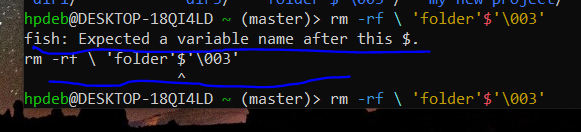
OrangePumkin@piefed.nl to linux4noobs@programming.devEnglish · 1 month agoI am trying to get rid of this folder, but the result is saying that fish expects a variable name after this $. What does it mean ? And how do i get rid of this folder ?objectstorage.eu-amsterdam-1.oraclecloud.comimagemessage-square31linkfedilinkarrow-up114arrow-down19
arrow-up15arrow-down1imageI am trying to get rid of this folder, but the result is saying that fish expects a variable name after this $. What does it mean ? And how do i get rid of this folder ?objectstorage.eu-amsterdam-1.oraclecloud.comOrangePumkin@piefed.nl to linux4noobs@programming.devEnglish · 1 month agomessage-square31linkfedilink
minus-squaresin_free_for_00_days@sopuli.xyzlinkfedilinkEnglisharrow-up2·edit-21 month agoAs others have said, tab-complete should be able to do it. If not, here are two other options: Is it the only “folder*” in the directory? $ ls *folder* ‘folder’$‘003’ If you only have that, you should be able to use the wildcards to delete it: rm *folder* Another is just find the inode and delete using that: $ ls -li | grep folder 5120013 .rw-rw-r-- user user 0 B Fri Jun 19 21:09:02 2026 ‘folder’$‘003’ $ find . -inum 5120013 -delete
minus-squareOrangePumkin@piefed.nlOPlinkfedilinkEnglisharrow-up1·1 month agoI have uninstalled and reinstalled my WSL. Nothing exists now.


As others have said, tab-complete should be able to do it. If not, here are two other options:
Is it the only “folder*” in the directory?
If you only have that, you should be able to use the wildcards to delete it:
Another is just find the inode and delete using that:
I have uninstalled and reinstalled my WSL. Nothing exists now.