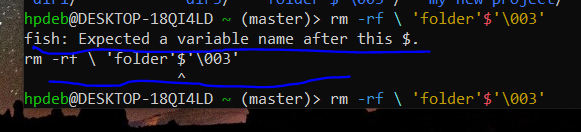
OrangePumkin@piefed.nl to linux4noobs@programming.devEnglish · 1 month agoI am trying to get rid of this folder, but the result is saying that fish expects a variable name after this $. What does it mean ? And how do i get rid of this folder ?objectstorage.eu-amsterdam-1.oraclecloud.comimagemessage-square31linkfedilinkarrow-up114arrow-down19
arrow-up15arrow-down1imageI am trying to get rid of this folder, but the result is saying that fish expects a variable name after this $. What does it mean ? And how do i get rid of this folder ?objectstorage.eu-amsterdam-1.oraclecloud.comOrangePumkin@piefed.nl to linux4noobs@programming.devEnglish · 1 month agomessage-square31linkfedilink
minus-squareneo@feddit.orglinkfedilinkarrow-up2·1 month agoI believe u should Type rm -r \'folder\'\$\'\\003\' Basically a \ interprets the following character as a character. With the ’ I’m not sure, so maybe rm -r 'folder'\$'\\003' could do the trick too Edit: correct code
minus-squareOrangePumkin@piefed.nlOPlinkfedilinkEnglisharrow-up1arrow-down3·1 month ago After doing the step, the cursor simply came in the centre.
minus-squareSuccessful_Try543@feddit.orglinkfedilinkarrow-up2·1 month agothere is a space between your first \ and the ' that doesn’t belong there. (The backslash escapes the space, but not the apostrophe, that’s why it’s coloured red and not cyan) Press Ctrl+C and try again with the corrected command.


I believe u should Type
rm -r \'folder\'\$\'\\003\'Basically a \ interprets the following character as a character. With the ’ I’m not sure, so maybe
rm -r 'folder'\$'\\003'could do the trick too
Edit: correct code
After doing the step, the cursor simply came in the centre.
there is a space between your first
\and the'that doesn’t belong there. (The backslash escapes the space, but not the apostrophe, that’s why it’s coloured red and not cyan)Press Ctrl+C and try again with the corrected command.